Drupal
Drupal is An open-source content-management framework, used for Website Builder eCommerce Content Marketing . Drupal includes 40,000+ modules and 2500+ themes available to extend site functionality and appearance. You can create and develop a website locally on your personal computer by Drupal.
Prepare
When referring to this document to use Drupal, please read and ensure the following points:
-
Login to Websoft9 Console and find or install Drupal:
- Go to My Apps listing applications
- Go to App Store installing target application
-
This application is installed by Websoft9 console.
-
The purpose of this application complies with the GPL-2.0 open source license agreement.
-
Configure the domain name or server security group opens external network ports for application access.
Getting started
Login verification
- After Completing the installation Drupal in the Websoft9 console,
- Obtain the applicaiton's access URL from Access tab
- Obtain Intranet Host and Password from Database tab
-
Local computer browser to access URL, starting the Drupal install wizard
-
The default Database configuration for you with:
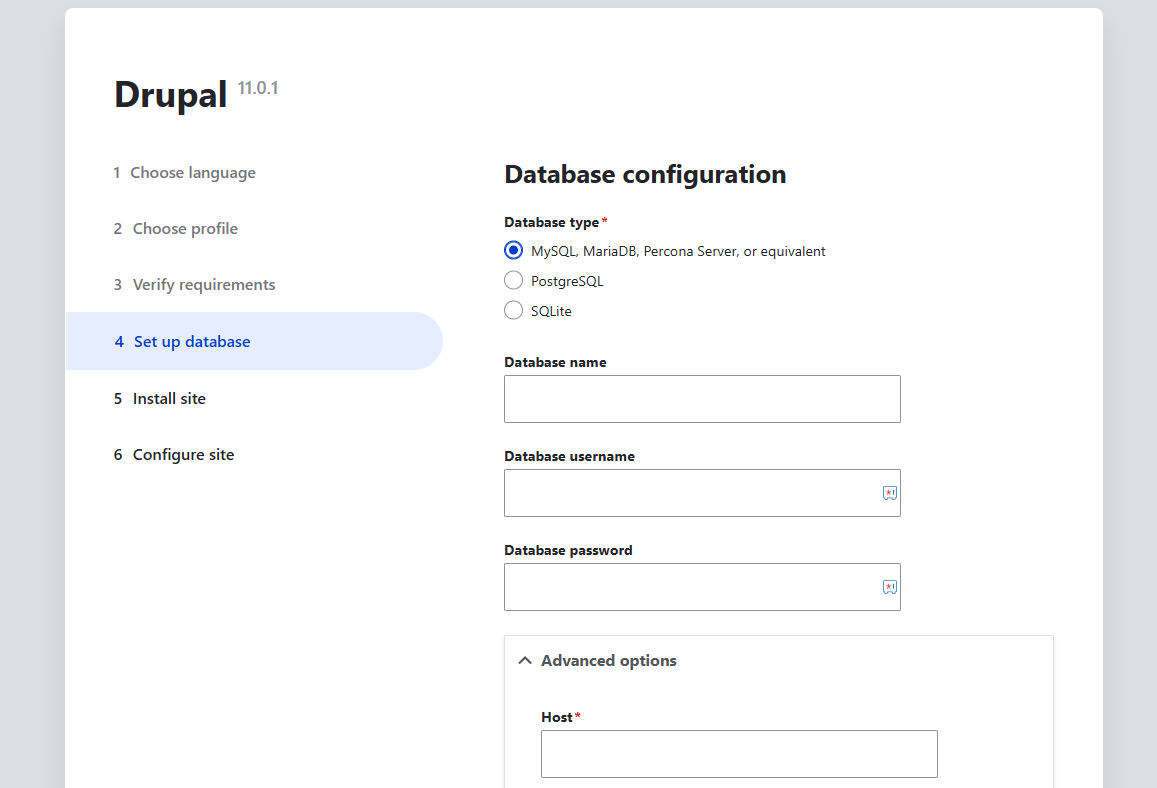
- Database type:
MySQL - Database name:
drupal - Database username:
drupal - Database password: Password from step1
- Advanced options > Host: Intranet Host from step1
You can fill other cloud database if you don't want to use the default
- Database type:
-
Complete the next steps
Setting up multilingual
Drupal supports multiple languages, but you need to follow these steps:
-
Log in to the Drupal, and install the desired language via Admin > Configuration > Region and Language.
-
After installing a new language, set it as the default language.
Install themes and modules
-
Download themes from Drupal Themes or modules from Drupal Modules.
-
Go to Extension Management > Install Extension, enter the download URL, and start the installation.
-
After a successful installation, enable the theme or module.
Configuration options
- Configuration file: /path/sites/default/settings.php
- Multilingual (✅)
- SMTP (✅): Install SMTP Authentication Support plugin for SMTP.
- 3rd Party CLI
- APIs
Administer
-
Changing URLs: Change the value in
.htaccessin the Drupal root directory with according to the domain name. -
Online backup: Install the Drupal extension Backup and Migrate to enable online backup policies.
Troubleshooting
Error when initializing [Install Translation]?
Description: When installing a translation, you need to download the translation file, which may timeout.
Reason: poor network connection.
Solution: Retry several times until it succeeds.
Drupal status report has an error?
This Error is actually a Warning and can be ignored.
Protecting against HTTP ...?
Description: In Drupal version 8.x or above, after installation, it prompts Protecting against HTTP HOST Header attacks.
Reason: Domain format error
Solution: Go to the settings.php file in the Drupal directory and insert the domain name as follows:
$settings['trusted_host_patterns']=['^www\.webosft9\.com$'];
Still suggesting security vulnerability after installation?
Refer to: Trusted Host settings